Beast TV APK: Guide, Features & Setup
Beast TV APK: Guide, Features & Setup
Introduction
Beast TV APK is an Android application package associated with the Beast TV experience. It can be used on compatible Android-based devices to access supported IPTV content and features.
In this guide, you’ll learn what Beast TV APK is, what devices may support it, how to set it up, and how to troubleshoot common problems.
Important: Only install applications from sources you trust, and use IPTV services and content that you are legally authorized to access.
What Is Beast TV APK?
Beast TV APK refers to the Android package used to install the Beast TV application on compatible Android devices.
An APK is an Android application package. It allows an application to be installed outside the standard app-store process when the device and software allow it.
Beast TV APK may be useful for users who want to access their Beast TV account on a compatible Android-based device.
What Do You Need Before Installing Beast TV APK?
Before getting started, make sure you have:
- A compatible Android device
- A stable internet connection
- The correct Beast TV application package
- Your Beast TV login information, if required
- Enough storage space for the application
Always verify the APK source before installing it.
Beast TV APK Compatible Devices
Compatibility depends on the version of the application and the device.
Android-based devices may include:
- Android TV devices
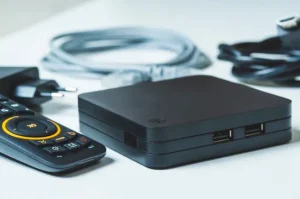
- Android TV boxes
- Compatible smartphones
- Compatible tablets
- Other supported Android devices
Some devices may require a version specifically designed for a TV interface.
Always check compatibility before installation.
How to Install Beast TV APK on Android
The installation process can vary depending on your Android device.
If your device allows APK installation, the general process is:
- Download the correct APK from a trusted source.
- Open the downloaded file.
- Review the installation prompt.
- Allow installation if your device requires permission.
- Install the application.
- Open Beast TV.
- Enter your account or service information if requested.
Do not install APK files from unknown or suspicious websites.
Beast TV APK on Android TV
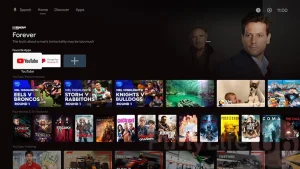
Android TV can provide a convenient way to use compatible streaming applications on a television.
Before installing Beast TV APK, check that the application version supports your Android TV device.
You should also make sure that your TV box has enough storage and a stable internet connection.
Once installed, open the application and follow the setup instructions provided by the service.
Beast TV APK on Firestick
Fire TV and Android TV are related platforms, but application compatibility is not always identical.
If you’re using a Firestick, first check whether the current Beast TV application officially supports your Fire TV device.
For general IPTV setup information, see our IPTV for Firestick guide.
How to Log In to Beast TV
If the application requires an account, use the login details provided with your Beast TV subscription.
Depending on the current application version, you may be asked for information such as:
- Username
- Password
- Server information
- Playlist information
Enter the details carefully.
If you cannot log in, verify that your account information is correct and active.
Beast TV APK Features
Available features can depend on the application version and your account.
Possible features may include:
- Live TV access
- Channel categories
- Search
- Favorites
- Electronic Program Guide
- On-demand content
- Multi-device compatibility
Features can change with future application updates.
How to Improve Streaming Performance
A stable internet connection is important for smooth streaming.
Try these simple steps:
Use a Stable Connection
Connect your device to a reliable Wi-Fi network.
If your device supports Ethernet, a wired connection can also be useful.
Restart Your Device
Restarting your Android device can solve temporary performance issues.
Close Unused Applications
Other applications running in the background may use system resources.
Close applications you don’t need while streaming.
Keep the App Updated
Use the latest compatible version from a trusted source when an update is available.
Beast TV APK Not Working
If Beast TV APK is not working correctly, start with the basics.
Check Your Internet
Make sure your device is connected to the internet.
Try another application to confirm that your connection is working.
Check Your Login Details
Incorrect credentials can prevent the application from connecting to your account.
Check your username and password carefully.
Restart the Application
Close Beast TV completely and open it again.
Restart Your Device
A simple restart can sometimes resolve temporary application problems.
Check Your Account
If your subscription or account has expired, some features may no longer work.
Contact the service provider if you need account assistance.
Beast TV APK Buffering
Buffering can have several causes.
Common causes include:
- Weak Wi-Fi
- Network congestion
- Slow internet
- Device performance
- Problems with the streaming source
Start by checking your internet connection.
If buffering continues, restart your router and Android device.
You can also read our IPTV Buffering Fix guide for more troubleshooting tips.
How to Clear the Beast TV App Cache
If the application becomes slow or freezes, clearing its cache may help.
On many Android devices, you can find this option under:
Settings → Apps → Beast TV → Storage → Clear Cache
Menu names can differ depending on your Android version and device.
Be careful with Clear Data, because it may remove saved application information.
Is Beast TV APK Safe?
APK files should always be downloaded carefully.
Before installing an APK, check:
- Where the file comes from
- Whether the source is trustworthy
- Whether the application matches your device
- Whether the file has been modified
- Whether your security software reports a problem
Avoid downloading APK files from random file-sharing websites.
Is Beast TV APK Free?
The APK file and the IPTV service are two different things.
An application package can be used to install an app, while access to content may require an account or subscription.
Check the current Beast TV pricing and service terms before purchasing anything.
Frequently Asked Questions
What is Beast TV APK?
Beast TV APK is an Android application package associated with the Beast TV service and can be installed on compatible Android devices.
Can I use Beast TV APK on Android TV?
It may work on compatible Android TV devices, depending on the application version.
Can I use Beast TV APK on Firestick?
Compatibility depends on the current application and Fire TV device. Check whether the current version officially supports your device.
Why is Beast TV APK buffering?
Buffering can be caused by your internet connection, network congestion, device performance, or the streaming source.
Why is Beast TV APK not opening?
Check your device compatibility, internet connection, application version, and available storage.
How do I fix Beast TV APK login problems?
Check your username and password first. If the details are correct, verify that your account is active and contact the service provider if necessary.
Can I install an APK on Android TV?
Many Android TV devices support compatible APK installation, although the exact process and restrictions depend on the device and software version.
Conclusion
Beast TV APK can provide a convenient way to use the Beast TV application on compatible Android devices.
Before installing it, check device compatibility and make sure you’re using a trustworthy application source.
If you experience problems, start by checking your internet connection, login information, application version, and device settings.
For the best experience, keep your device updated and use only IPTV services and content that you are legally authorized to access.