IPTV for Smart TV: How to Choose the Right Streaming Service
IPTV for Smart TV: How to Choose the Right Streaming Service
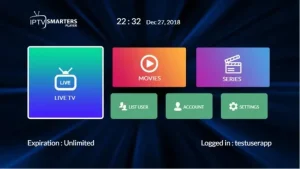
Smart TVs have changed the way people watch television. Instead of relying only on traditional cable or satellite packages, viewers can use internet-based streaming services to access live television and on-demand entertainment directly through compatible devices.
For people searching for IPTV for Smart TV, the most important step is choosing a service that matches their device, viewing habits, budget, and location.
In this guide, we’ll explain what to look for before subscribing and how to prepare your Smart TV for internet-based television streaming.
What Is IPTV?
IPTV stands for Internet Protocol Television. It refers to television content delivered through an internet connection rather than traditional broadcast, cable, or satellite methods.
Depending on the provider and its content rights, an IPTV service may offer live television, on-demand programming, sports, entertainment, news, or international content.
The experience depends on several factors, including the provider, your internet connection, your Smart TV, and the application used to access the service.
Why Use IPTV on a Smart TV?
One of the biggest advantages of using a Smart TV is convenience.
You can potentially watch internet-based television without connecting a traditional cable box to your television.
Some Smart TVs can run compatible streaming applications directly, while others may work with an external streaming device.
A Smart TV setup can provide:
- A large-screen viewing experience
- Easy access to streaming applications
- Fewer connected devices
- Remote-control navigation
- Access to multiple entertainment services
- Flexible viewing options
However, compatibility should always be checked before purchasing a subscription.
How to Choose the Best IPTV for Smart TV
There are many services competing for attention, so comparing them carefully is important.
1. Check Smart TV Compatibility
First, determine which operating system your television uses.
Different Smart TVs can use different platforms, and not every application works on every model.
Before subscribing, check whether the provider officially supports your television or the streaming application you intend to use.
2. Look at Available Content
Don’t choose a service simply because it advertises a large number of channels.
Think about what you actually watch.
For example, you may primarily be interested in:
- Live TV
- Sports
- Movies
- News
- Entertainment
- International programming
- Kids’ programming
- On-demand content
The most useful service is the one that provides the content you want and is authorized to distribute it in your location.
3. Consider Streaming Quality
Picture quality matters when watching television on a large screen.
Depending on the service and content source, you may encounter different resolutions such as HD or 4K.
But resolution isn’t everything.
Your internet connection, Wi-Fi signal, television hardware, and network traffic can all influence playback.
A stable connection is therefore essential for a good Smart TV streaming experience.
4. Review Pricing Carefully
Before buying an IPTV subscription, look beyond the advertised monthly price.
Check:
- Subscription duration
- Total cost
- Supported devices
- Number of simultaneous connections
- Renewal terms
- Refund policy
- Available customer support
Clear pricing makes it easier to compare different services.
5. Check Customer Support
Technical problems can happen with any internet-based service.
A provider that offers clear setup instructions and accessible customer support can make the process much easier, particularly for users who are new to IPTV.
How Does IPTV Work on a Smart TV?
The exact process depends on your television and the provider.
In general, the process looks like this:
Choose a service → Check compatibility → Install a supported application → Sign in → Configure the service → Start streaming
Some providers may use their own application, while others may provide instructions for compatible third-party players.
Always follow the provider’s official setup instructions.
IPTV Smart TV Setup Tips
If you’re preparing your television for IPTV, there are several simple things you can check beforehand.
Use a Stable Internet Connection
Wi-Fi can work well, but the quality of your connection depends on your router, distance from the router, network congestion, and other factors.
If your television supports Ethernet, a wired connection can sometimes provide a more consistent connection.
Keep Your TV Updated
Make sure your Smart TV has the latest available system and application updates.
Older software can sometimes cause compatibility problems with newer applications.
Check Available Storage
If you’re installing applications directly on the television, make sure there is enough available storage.
Restart Your Network When Necessary
If streaming suddenly becomes unstable, restarting your router and television can sometimes resolve temporary network issues.
IPTV on Smart TV vs External Streaming Device
Not everyone needs an external device.
If your Smart TV already supports the application you need, you may be able to stream directly from the television.
An external streaming device can nevertheless be useful if:
- Your Smart TV is older
- The required application isn’t available
- You want a different operating system
- You want to use the same setup on multiple televisions
The best option depends on your existing equipment.
Is IPTV Legal?
IPTV technology itself is simply a method of delivering television content over the internet.
The important distinction is what content a service distributes and whether it has the necessary rights to distribute that content.
Before subscribing, choose providers that clearly explain their service and content rights, and make sure the programming you access is authorized in your region.
Beast TV for Smart TV Streaming
If you’re considering Beast TV for your Smart TV setup, you can review the available service information, supported devices, and subscription options directly on the website.
Before purchasing, check the current information on the website to make sure the service matches your television and viewing requirements.
The goal isn’t simply to find the service with the largest marketing claims. It’s to find an option that is compatible with your equipment and provides the type of viewing experience you need.
Common Smart TV IPTV Problems
Sometimes the problem isn’t the streaming service itself.
Here are some common issues to check.
Buffering
Buffering can be related to internet speed, Wi-Fi stability, network congestion, or the streaming source.
Application Problems
If an application freezes or closes unexpectedly, check whether an update is available and restart the television.
Login Problems
Double-check your account information and make sure you’re using the current credentials supplied by the provider.
Connection Problems
Restarting the router and television can help identify whether the problem is temporary.
If the issue continues, contact the provider’s support team.
Frequently Asked Questions
Can I use IPTV on a Smart TV?
Yes, some IPTV services support Smart TVs through compatible applications. Compatibility depends on the television model, operating system, application, and provider.
What is the best IPTV for Smart TV?
There isn’t one service that is best for everyone. Compare compatibility, content availability, pricing, support, and service terms before making a decision.
Do I need a Firestick for IPTV on Smart TV?
Not necessarily. If your Smart TV supports the required application, you may be able to stream directly from the television. An external streaming device is another option when direct compatibility isn’t available.
Does IPTV require internet?
Yes. IPTV delivers television content through an internet connection, so a stable connection is important.
Can IPTV work on older Smart TVs?
It depends on the TV’s operating system and available applications. Older televisions may have fewer compatible options.
Is IPTV the same as Netflix?
No. IPTV is a method of delivering television content over the internet, while Netflix is a specific streaming service. Different services have different content libraries and licensing arrangements.
Final Thoughts
Finding the right IPTV for Smart TV starts with compatibility.
Before subscribing, check your television’s operating system, available applications, internet connection, pricing, customer support, and the content offered by the service.
Avoid choosing a provider based only on channel numbers or low prices. A transparent service with clear information and suitable device support is a better starting point.
If you’re considering Beast TV, visit the official website to review the latest service information and determine whether it fits your Smart TV setup.